Increase Image Size in KB
Click to upload or drag & drop an image
Increase Image Size in KB Online
Need to increase image size in KB for an online form, application, registration portal, profile upload, or document submission? Bagofa helps you prepare an image when its file size is below the required minimum.
Many upload systems specify a file-size range such as 20 KBโ50 KB, 50 KBโ100 KB, or a minimum of 100 KB. If your photo is smaller than the required limit, it may be rejected even when the image looks perfectly clear.
What Does It Mean to Increase Image Size in KB?
When people say they want to increase an image size, they may mean two different things: increasing the file size in KB or MB, or increasing the image dimensions in pixels.
Increase File Size
File size describes the amount of digital data contained in the image file. It can be measured in KB, MB, or bytes.
Increase Dimensions
Image dimensions describe the width and height of an image in pixels, such as 500 ร 500 or 1200 ร 800 pixels.
Know the Difference
A larger pixel dimension does not guarantee a specific KB value. File size depends on format, content, compression, and other image data.
For example, an image could be 500 ร 500 pixels and 30 KB, while another image could have the same dimensions but be 100 KB because it contains different encoded data.
Why Would You Need to Increase an Image File Size?
Most image tools are designed to make files smaller. However, some online platforms have the opposite requirement: they reject images that are below a minimum file size.
Online Forms
Some forms require photographs, signatures, or documents to meet a minimum KB value.
Applications
Examination, educational, recruitment, and registration applications may specify file-size limits.
Profile Uploads
Profile systems and membership portals can require images within a particular size range.
- Online application forms
- Recruitment and job forms
- Examination applications
- Registration portals
- Profile photo submissions
- Government application portals
- Educational applications
- Professional registration forms
- Membership forms
- Document submission systems
Increase Image Size Without Changing the Visible Picture
There are different technical ways to make an image file larger. Depending on the format and requirements, additional data can sometimes be included without changing the visible pixels, while other approaches may re-encode the image or alter its dimensions.
The appropriate approach depends on the image format and the requirements of the destination website. Making a file larger does not necessarily make the picture clearer.
How to Increase Image Size in KB
Increasing an image's file size can be useful when you already have a suitable image but its file size is below the minimum required by a website.
Select Your Image
Choose the JPG, JPEG, PNG, or WebP image you want to prepare.
Check Current Size
Check the original image file size before making any changes.
Enter Required KB
Identify the minimum, maximum, or target file size shown by the website.
Prepare the Image
Process the image according to the selected file-size requirement.
Verify the Result
Check the final file size, dimensions, and format before submission.
Increase JPG Image Size in KB
JPG and JPEG are widely used for photographs because they can store detailed images in relatively compact files. If a JPG photo is below the minimum KB requirement, you may need to prepare its file size before submitting it.
Passport Photos
Prepare photographs when an application specifies a particular file-size range.
ID Photos
Useful for online registration systems that specify JPG or JPEG requirements.
Application Forms
Meet a minimum file-size condition when the original JPG is smaller than required.
Example: if the original JPG is 32 KB and the application requires a minimum of 50 KB, the image needs to meet that minimum while also satisfying any maximum size, dimensions, or format requirements.
Increase JPEG Size in KB
JPEG is essentially the same commonly used image format as JPG. The difference is primarily the file extension. If an online form accepts JPEG and requires a minimum file size, prepare the image according to the stated requirement.
Increase PNG Image Size in KB
PNG images are commonly used for graphics, logos, screenshots, illustrations, and images requiring transparency. Because PNG uses different compression characteristics from JPG, images with the same dimensions can have very different file sizes.
If your PNG is below a required minimum, preparing its file size may help satisfy a portal's file-size condition. However, if the destination specifically requests JPG or JPEG, changing the format may be necessary instead of simply increasing the PNG file size.
Increase WebP Image Size in KB
WebP is a modern image format designed for efficient web image delivery. A WebP file may be considerably smaller than another format containing similar visual information.
If a website requires a minimum KB value, check whether WebP is accepted before preparing the image. If the website only accepts JPG or PNG, converting the image to the required format may be more appropriate.
KB vs. Image Dimensions: What's the Difference?
This is one of the most important things to understand when preparing images for online forms. File size in KB and image dimensions in pixels are separate measurements.
File Size in KB
Describes how much digital data is contained in the image file.
- 25 KB
- 50 KB
- 100 KB
- 250 KB
- 1 MB
Image Dimensions
Describe the width and height of an image using pixels.
- 300 ร 300 pixels
- 600 ร 600 pixels
- 1200 ร 800 pixels
- 1920 ร 1080 pixels
Different Requirements
A website may check KB, pixels, format, aspect ratio, or several requirements at the same time.
A 600 ร 600 pixel image can be 40 KB, 80 KB, or considerably larger depending on its format, content, compression, and other image data.
Does Increasing KB Improve Image Quality?
Not necessarily. A larger file can contain more encoded data, but simply making a file larger cannot recreate details that were absent from the original photograph.
If better visual quality is required, start with the clearest original image available. File size and image quality should be treated as separate properties.
When Should You Increase Image Dimensions?
Increasing dimensions may be useful when a website specifies a minimum pixel width or height, such as:
Minimum Width
600 pixels minimum width.
Minimum Height
600 pixels minimum height.
Specific Dimensions
300 ร 400 pixels may be required for a particular form.
This is different from a requirement such as minimum file size: 50 KB or maximum file size: 100 KB. Before changing an image, identify whether the website is checking KB, pixels, or both.
Common Image Size Requirements
Different websites can use different requirements. Always follow the exact instructions displayed by the destination website.
| Requirement | Meaning |
|---|---|
| Minimum 20 KB | File must not be smaller than 20 KB. |
| Minimum 50 KB | File must be at least 50 KB. |
| 50โ100 KB | File must fall within the specified range. |
| Maximum 100 KB | File must not exceed 100 KB. |
| 200 KB maximum | File must remain below the specified maximum. |
| 600 ร 600 px | Specific pixel dimensions are required. |
Increase Image Size for Online Forms
Online forms are one of the common situations where users need to increase an image's KB size. A form may ask for a photograph with a minimum file size.
If a phone camera, messaging platform, or previous image optimization process created a very small file, the upload may fail. Preparing the image to meet the specified file-size range can help address that particular technical requirement.
Increase Photo Size in KB for Applications
Applications can have strict photo specifications. For example, an application might request a JPG photograph with a minimum of 20 KB and a maximum of 100 KB.
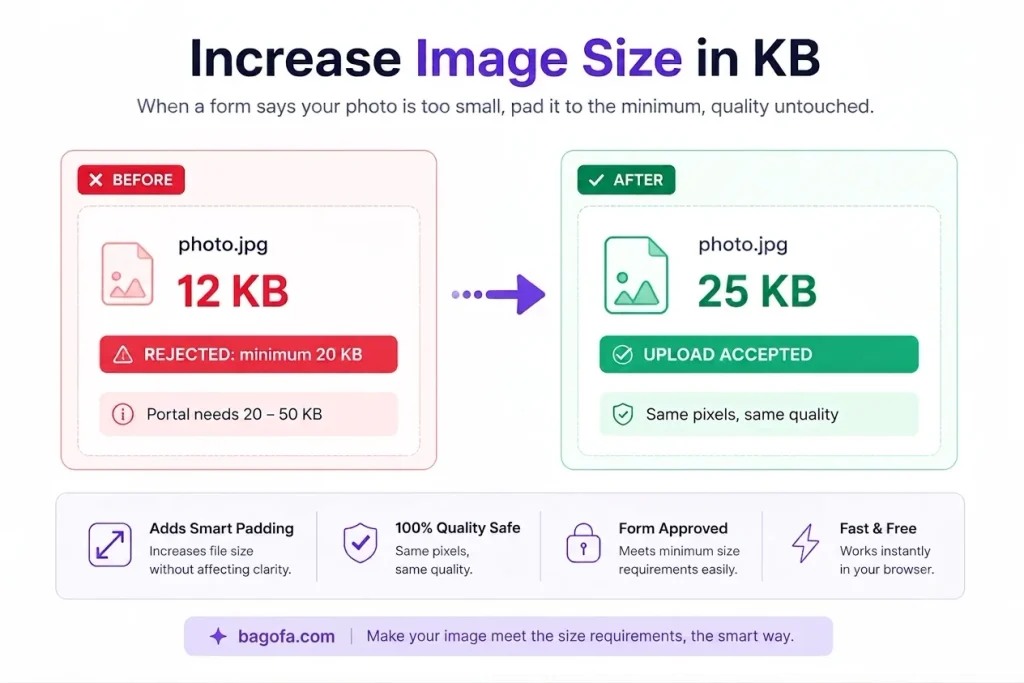
If your photograph is only 12 KB, it does not satisfy the minimum requirement. In this situation, increasing the file size is different from simply making the photo appear larger on screen.
Increase Image Size for Government Forms
Government and public-service application portals may specify image requirements involving both file size and dimensions. Before submitting a photograph, carefully check:
File Format
Check whether JPG, JPEG, PNG, WebP, or another format is accepted.
File Size
Check minimum and maximum KB or MB limits.
Dimensions
Check width, height, aspect ratio, and any required pixel dimensions.
Do not assume that meeting the KB requirement alone guarantees acceptance. Follow every requirement shown on the relevant application portal.
Increase Image Size for Job Applications
Recruitment and employment portals can also have specific image requirements. A job application may request a photograph or signature within a particular file-size range.
If your image is below the minimum, preparing it to meet the required KB range can help satisfy that particular technical requirement. Always check the complete specifications before uploading.
Increase Signature Image Size in KB
Signatures are often much smaller than photographs because they may contain only a few lines or strokes. As a result, a signature image can sometimes be below a portal's minimum file-size requirement.
How to Choose the Correct Target Size
The safest approach is to use the requirement provided by the destination website. Do not choose an arbitrary target when the portal provides a specific range.
Minimum 50 KB
Aim for at least 50 KB, provided there is no maximum limit.
20 KB to 50 KB
Keep the final image between 20 KB and 50 KB.
Maximum 100 KB
The file must remain at or below the specified maximum.
Increase Image Size vs. Compress Image
These two tasks are generally used for opposite file-size requirements.
Increase Image Size
Used when a file is too small to satisfy a minimum KB requirement.
Compress Image
Used when a file is too large and needs to stay below a maximum KB limit.
Check the Requirement
Always identify whether the destination requires a minimum, maximum, or range.
Tips for Getting the Right Image File Size
Check the Requirement First
Look at the exact requirements on the destination website before choosing a target size.
Keep the Original Image
Start with the clearest original version available whenever possible.
Check KB and Pixels
Some forms require both a particular file size and specific image dimensions.
Use the Correct Format
If the form requests JPG, use JPG. Follow the exact accepted formats.
Verify Before Submission
Check the final file size, dimensions, and format before uploading.
Avoid Unnecessary Changes
If your image already meets all requirements, there is usually no reason to modify it.
Frequently Asked Questions
How can I increase image size in KB?
First check the minimum or target file size required by the destination. Then prepare the image to meet that KB requirement and verify the final file size before submission.
Can I increase a 20KB image to 50KB?
Yes. If a website requires a minimum of 50 KB and your image is 20 KB, you can prepare its file size to meet the requirement.
Can I make an image exactly 100KB?
An exact file size can depend on the image format and processing method. In many cases, targeting an acceptable range is more practical than expecting every image to have exactly the same byte count.
Does increasing image size make the image clearer?
No. Increasing the KB value does not automatically restore missing image detail. A larger file size and better image quality are not the same thing.
Can I increase JPG image size in KB?
Yes. JPG images can be prepared to meet a larger file-size requirement when a website specifies a minimum KB value.
Can I increase PNG image size in KB?
Yes. PNG files can also be prepared for minimum file-size requirements, depending on the processing method and destination requirements.
Can I increase WebP image size in KB?
Yes, provided the destination accepts WebP. If the website requires JPG or PNG, use the format specified by the website.
What is the difference between KB and pixels?
KB describes the file size, while pixels describe the image dimensions. A larger pixel dimension does not guarantee a particular KB value.
Why does a website say my image is too small?
The website may have a minimum file-size requirement. For example, if the form requires at least 50 KB and your image is 25 KB, the system can reject it.
What should I do if the form requires 20KB to 50KB?
Make sure the final image is at least 20 KB but no more than 50 KB. Also check any separate requirements for dimensions and format.
Can I increase image size for a passport photo?
Yes. If the application specifies a minimum file size for the passport photo, you can prepare the image to meet that requirement. Check the dimensions, format, and maximum size as well.
Can I increase a signature image to a required KB size?
Yes. Signatures can be very small files, so a minimum KB requirement may require the file to be prepared differently. Check the portal's complete signature specifications before submitting it.
Does a bigger KB file mean higher resolution?
No. KB and resolution are different properties. A file can be large in KB without having higher resolution, and a high-resolution image can sometimes have a relatively small file size depending on its format and compression.
Related Image Conversion Tools
Convert images between popular formats with Bagofa's collection of online image conversion tools. Choose the format required by your website, form, application, or digital project.
JPG to PDF Converter
Convert JPG images into PDF format for forms, documents, applications, and sharing.
JPG to PDF โPNG to JPG Converter
Convert PNG images to JPG format when a website or application requires JPEG images.
PNG to JPG โJPG to PNG Converter
Convert JPG photos to PNG images for graphics, transparency, editing, and digital use.
JPG to PNG โWebP to PNG Converter
Convert WebP images to PNG while supporting workflows that require the PNG format.
WebP to PNG โPNG to WebP Converter
Convert PNG images to WebP for modern websites and efficient image delivery.
PNG to WebP โWebP to JPG Converter
Convert WebP images to JPG for platforms and applications that require JPEG format.
WebP to JPG โJPG to WebP Converter
Convert JPG images to WebP for websites and modern image delivery workflows.
JPG to WebP โWebP to GIF Converter
Convert WebP images to GIF format for compatible graphics and image workflows.
WebP to GIF โWord to JPG Converter
Convert Word document pages to JPG images for websites, presentations, and digital sharing.
Word to JPG โPrepare Images for the Right File-Size Requirement
Before submitting an image, check the required file size, format, dimensions, and other specifications. Bagofa provides a collection of image tools to help prepare images for different digital requirements.