
Image Compressor
Drop your images here or browse.
Supports JPG, PNG, WEBP (Up to 25 MB)Original Preview
Compressed Preview
Large image files can be a little frustrating when you are trying to upload a photo to a website, submit an online form, or send pictures to someone. Sometimes, a single image is larger than the website allows. Other times, a page takes longer to load because the pictures are unnecessarily heavy.
That is where an Image Compressor comes in handy.
With Bagofa Image Compressor, you can reduce image file sizes online without going through a complicated editing process. Whether you are preparing a photograph for an application form, optimizing pictures for your blog, or making images easier to share, compressing them can save time and storage space.
The goal is simple: make your image file smaller while keeping it clear enough for its intended purpose.
What Is an Image Compressor?
An image compressor is an online tool that reduces the amount of data used to store an image. Depending on the image format and compression method, it can make a photograph or graphic considerably smaller without changing its dimensions.
For example, imagine you have a 3 MB photograph but need to upload it to a website that accepts images up to 500 KB. Compressing the photograph may help bring its file size closer to the limit. The actual result depends on the original image and the compression settings.
Image compression is useful for students, website owners, photographers, office workers, online sellers, and anyone who regularly works with digital pictures.
Why Should You Compress Images?
Most modern smartphones and digital cameras produce high-resolution images. These pictures can look excellent, but their file sizes may be larger than necessary for everyday online tasks.
Here are a few situations where image compression can make a difference:
- Online forms: Reduce a photo’s file size when an application portal has an upload limit.
- Websites and blogs: Optimize images to help pages load more efficiently.
- Email attachments: Make pictures easier to attach and send.
- Social media: Prepare images for sharing when file-size limits apply.
- Online stores: Manage product photographs more efficiently.
- Documents: Reduce the size of image files used in reports, assignments, and presentations.
- Storage management: Keep image collections more manageable.
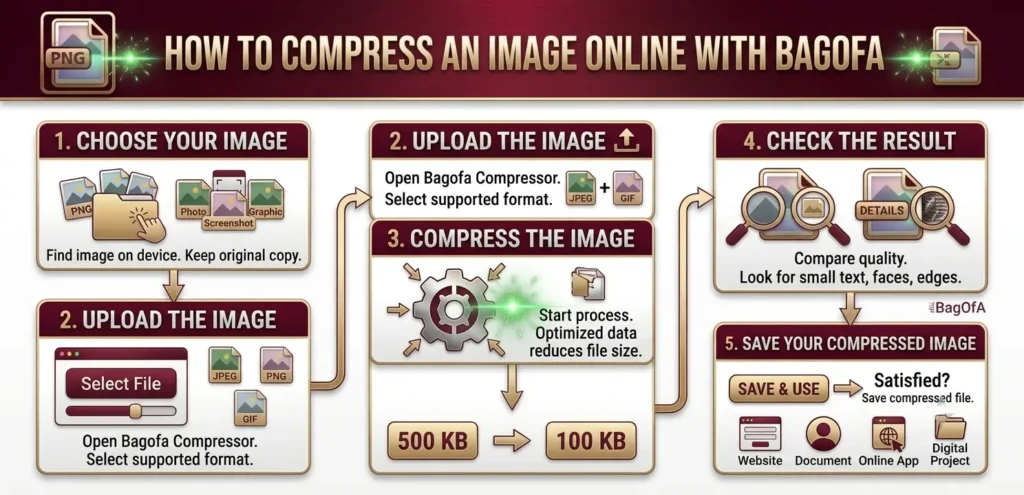
How to Compress an Image Online with Bagofa
You do not need to be an image-editing expert to get started. The process is straightforward.
Step 1: Choose Your Image
Find the photograph, screenshot, or graphic you want to compress on your device. If possible, keep an original copy so you can return to it later.
Step 2: Upload the Image
Open the Bagofa Image Compressor and select your image. Make sure the file is in a format supported by the tool.
Step 3: Compress the Image
Start the compression process. The tool optimizes the image data to reduce the file size. The amount of compression may vary depending on the format, dimensions, and original image quality.
Step 4: Check the Result
Look at the compressed image and compare it with the original. Pay attention to small text, sharp edges, faces, and other details that matter for your particular use.
Step 5: Save Your Compressed Image
Once you are satisfied with the result, save the compressed file and use it wherever you need it, such as on a website, in a document, or in an online application.
Image Compression Example
Original Image
Illustrative example: larger file size before compression.
Compressed Image
Illustrative example: smaller file size after compression.
Illustration idea: Show the same photograph in two panels, labelled “Original Image” and “Compressed Image,” with their file sizes displayed underneath. Use actual file sizes only when you have tested the example images.
Suppose you have a photograph that is too large to upload. Compressing it may reduce the file size while keeping the image suitable for viewing. However, the result is not identical for every image. A detailed photograph, a simple illustration, and a transparent PNG may respond differently to compression.
If you also need to change the image dimensions, try the Bagofa Image Resizer. Resizing and compression solve different problems, and using both may be helpful for particularly large images.
Practical Tips for Better Image Compression
A few small decisions can help you get a better result.
- Keep a copy of the original image whenever possible.
- Check the upload limit before compressing an image for an online form.
- Avoid excessive compression when the picture contains important details.
- Consider resizing an oversized image before compressing it.
- Choose an appropriate image format for the intended use.
- Check the final file size and image appearance before submitting or publishing it.
- Use the correct dimensions for profile pictures, banners, and product photos.
One important thing to remember is that image compression and image resizing are not the same. Compression reduces the amount of data in an image file, while resizing changes its width and height. A picture can be compressed without changing its dimensions.
Related Image Tools on Bagofa
Sometimes, reducing the file size is only one part of preparing an image. You may also need to crop a photo, change its format, or adjust its dimensions. These Bagofa tools can help with those tasks.
Explore more tools on the Bagofa website to find image utilities for your everyday tasks.
Related Image Conversion Tools
Bagofa also provides tools for changing images into other formats, depending on what your task requires.
- JPG to PNG Converter – Convert JPG images to PNG format.
- JPG to WebP Converter – Prepare JPG images for supported WebP workflows.
- PNG to JPG Converter – Convert PNG images to JPG format.
- PNG to WebP Converter – Convert PNG images to WebP.
- WebP to JPG Converter – Create JPG versions of supported WebP images.
- WebP to PNG Converter – Convert WebP images to PNG.
- JPG to PDF Converter – Turn JPG pictures into PDF documents.
- PNG to PDF Converter – Prepare PNG images for PDF documents.
Choose the tool according to the format or dimensions you need. Changing the file format may affect the final file size, but conversion does not guarantee that an image will become smaller.
Frequently Asked Questions
1. What is an image compressor?
An image compressor reduces the file size of an image by optimizing its stored data. Depending on the compression method, the image may retain most of its original appearance or lose some visual detail.
2. Can I compress images online for free?
Yes. You can use the Bagofa Image Compressor to compress supported images online for free.
3. Does compressing an image reduce its quality?
It can. Some compression methods preserve image information, while others discard data to reduce the file size. The result depends on the image format and compression method.
4. Can I compress an image without changing its dimensions?
Yes. Image compression can reduce file size while keeping the same width and height. Resizing is a separate process that changes those dimensions.
5. Can image compression help with online applications?
Yes. Compressing an image may help when an application website limits the maximum upload size. Always check the final file size against the portal’s requirements.
6. Which image formats can be compressed?
Common image formats include JPG, JPEG, PNG, WebP, and GIF. The formats you can use depend on the specific tool and its supported input types.
7. How much can an image be compressed?
There is no single amount that applies to every image. Results depend on the original file size, image content, format, dimensions, and compression settings.
8. Is image compression useful for websites?
Yes. Optimized images can reduce the amount of data a website needs to transfer. Page performance also depends on factors such as hosting, caching, scripts, and other page resources.
9. Should I resize an image before compressing it?
If the image dimensions are much larger than necessary, resizing it first may help reduce its file size. You can then compress it further if needed.
10. What is the difference between JPG and PNG compression?
JPG commonly uses lossy compression, which can reduce file size by discarding some image information. PNG typically uses lossless compression, which preserves the original pixel information but may produce larger files for photographs.
11. Can I compress images for email attachments?
Yes. Smaller image files are often more convenient to attach to emails, particularly when you need to send several pictures.
12. Can I use an image compressor on my phone?
You can access browser-based image tools on many smartphones, provided the browser, file format, and tool support your device and image.
13. Will compressing an image make it blurry?
Not necessarily. A moderate reduction may leave the image looking almost unchanged, while aggressive lossy compression can create visible blur or unwanted artifacts.
14. Can I compress a transparent PNG image?
PNG images can be optimized, but the results depend on their content and the compression method. If transparency is important, check the output to ensure it has been preserved.
15. Does converting JPG to WebP reduce file size?
WebP can offer smaller files for some images at a comparable visual quality. However, the result varies, and conversion alone does not guarantee a smaller file.
16. Is image compression the same as changing image resolution?
No. Compression reduces the amount of data used to store an image. Resolution describes its pixel dimensions or, in some contexts, pixel density.
17. Can image compression improve website loading speed?
It can help when large image files are a significant part of the page’s total transfer size. The overall improvement depends on the website and its other performance factors.
18. Should I keep my original image?
Yes, keeping an original copy is a sensible habit. It gives you a higher-quality source if you later need to edit the image or create another version.
19. Can I compress images for social media?
Yes. Compression can help prepare images for uploading and sharing. You should also follow the platform’s recommended dimensions and file requirements.
20. How do I choose the right image tool?
Choose an image compressor when the file size is too large, an image resizer when the dimensions need to change, a crop tool when you need to remove unwanted areas, and an image converter when you need a different format.
Compress Your Images with Bagofa
Large image files do not always need to stay large. Whether you are preparing a photo for an online form, organizing pictures for work, or optimizing images for your website, compression can make everyday image tasks easier.
Try the Bagofa Image Compressor to get started. If your image also needs different dimensions or a new format, explore the Image Resizer and Image Converter to find the right tool for your next step.