
HEIC to JPG
Drop HEIC / HEIF files or click to browse
Select single or multiple iPhone photos
Have you ever tried uploading a photo from your iPhone and discovered that the website does not accept the file? This can happen because many Apple devices save photos in HEIC format, which is not supported everywhere.
The good news is that you do not need to edit your photo or take another picture. You can convert it to JPG and use it on websites, social media, online forms, and other platforms that support this popular image format.
With the Bagofa HEIC to JPG Converter, you can turn your HEIC photos into JPG images in just a few simple steps. It is a convenient option when you need a more widely compatible image for everyday use.
How to Convert HEIC to JPG Online
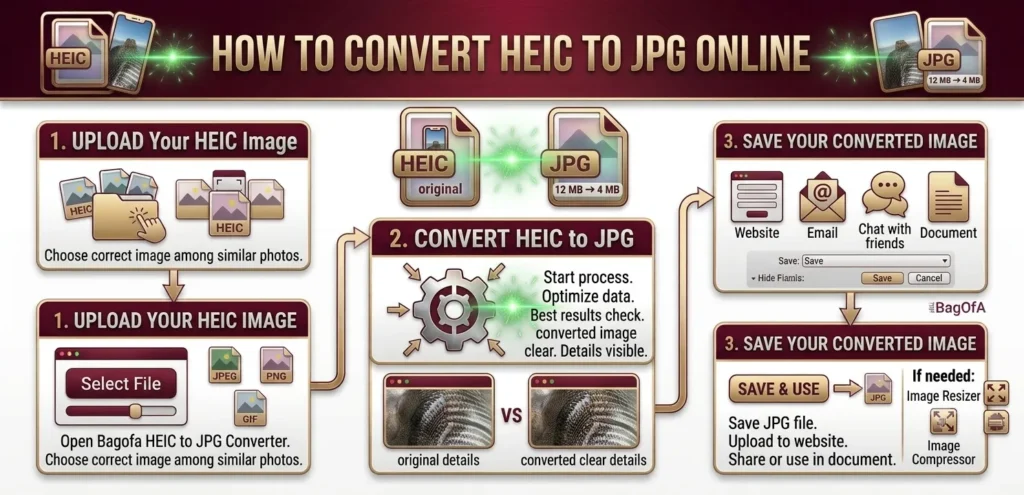
Converting a HEIC image is straightforward. You only need to select your photo, start the conversion, and save the resulting JPG file.
Upload Your HEIC Image
Open the HEIC to JPG Converter on Bagofa. Select the HEIC photo you want to convert from your device.
Choose the correct image, especially if you have several similar photos saved on your phone or computer.
Convert HEIC to JPG
Start the conversion process and let the tool process your image. The resulting JPG file will be suitable for platforms that support the JPG format.
For the best results, check that your converted image looks clear and that important details are still visible.
Save Your Converted Image
Once the conversion is complete, save the JPG image to your device. You can then upload it to a website, attach it to an email, share it with friends, or use it in a document.
If you need to adjust its dimensions or reduce its file size, Bagofa also offers an Image Resizer and an Image Compressor.
What Is HEIC?
HEIC stands for High Efficiency Image Container. It is an image container format commonly associated with Apple devices, including iPhones and iPads.
One reason HEIC became popular is its ability to store detailed photographs efficiently. Depending on the image and encoding settings, a HEIC file may take up less storage space than a comparable JPEG image while retaining good visual quality.
However, compatibility can sometimes be inconvenient. You might be able to view a HEIC photo on your phone but find that a website, older application, or online form does not accept it.
Where Are HEIC Images Commonly Used?
HEIC files are often found in:
- Photos taken with compatible iPhones and iPads
- Personal photo libraries
- High-quality mobile photography
- Image collections transferred from Apple devices
- Digital photo storage and supported applications
If you regularly move pictures between different devices, converting HEIC files to JPG can make your workflow easier.
What Is JPG?
JPG, also known as JPEG, is one of the most widely supported image formats. It is commonly used for photographs, website graphics, online listings, blog posts, and social media content.
JPG uses lossy compression, which reduces file size by discarding some image information. At suitable quality settings, the visual difference may be difficult to notice in everyday photographs.
Its broad compatibility is one of the main reasons people choose JPG when sharing pictures or submitting images online.
Common Uses of JPG Images
JPG files are useful for:
- Website and blog photographs
- Social media posts and profile pictures
- Online application forms
- E-commerce product listings
- Email attachments
- Digital documents and presentations
- Photography portfolios
- Everyday photo sharing
If your image is already in another format, you can explore Bagofa’s JPG to PNG Converter or JPG to WebP Converter to prepare it for a different purpose.
Why Convert HEIC to JPG?
The main reason to convert HEIC to JPG is compatibility. You may love the way your iPhone stores photos, but the website receiving those photos might require a different format.
Here are some everyday situations where conversion can help.
1. Upload Photos to Online Forms
Some application portals, registration pages, and document submission websites accept JPG or JPEG files but do not support HEIC.
Converting your photo beforehand can help you prepare a file in the required format. Always check the website’s file type, size, and dimension requirements before submitting it.
2. Share Pictures More Easily
When sending photographs to someone who uses a different phone, computer, or application, JPG is often a convenient choice because it is supported across many platforms.
3. Use Images on Websites
JPG is a common format for website photographs, articles, and online store listings. Converting a HEIC photo to JPG can help when your website editor or content management system does not accept HEIC files.
For better page performance, you may also want to explore Bagofa’s JPG to WebP Converter.
4. Prepare Product Photos for Online Stores
Product images need to display correctly across shopping platforms and devices. If your original product photos are stored as HEIC files, converting them to JPG can make them easier to upload wherever JPG is supported.
5. Add Photos to Documents
JPG images can be inserted into many documents, presentations, and other digital projects. If you need to combine photographs into a shareable document, try the JPG to PDF Converter.
6. Work With Images on Different Devices
A photo that opens on one device may not work as expected in another application. JPG’s widespread support makes it a practical format when moving images between phones, tablets, computers, and web services.
HEIC vs JPG: What Is the Difference?
Both HEIC and JPG are useful image formats, but they serve slightly different needs.
| Feature | HEIC | JPG |
|---|---|---|
| Full name | High Efficiency Image Container | Joint Photographic Experts Group |
| Compression | Supports efficient compression | Uses lossy compression |
| Image quality | Can retain high visual quality | Can retain high visual quality |
| File size | Often smaller at comparable quality | Can be larger at comparable quality |
| Web compatibility | Depends on the browser and platform | Very broad |
| Transparency | Depends on the encoding and supported implementation | Does not support transparency |
| Common association | Apple devices and modern image workflows | Websites, photography, and digital sharing |
| Best suited for | Efficient photo storage | Broad compatibility and sharing |
Neither format is automatically better for every situation. HEIC can be useful for saving space, while JPG is often the easier choice when compatibility matters most.
Does Converting HEIC to JPG Reduce Image Quality?
It can. JPG uses lossy compression, so converting a HEIC image to JPG may change some image details depending on the converter and its quality settings.
For normal photo sharing and online uploads, the result may still look very good. However, if you are working with professional photography or images that need fine details, compare the original and converted versions before using the final file.
Keep your original HEIC image if you might need it later. Also remember that converting a file to JPG does not automatically make it smaller in every case.
How to Get Better Results When Converting HEIC Images
A few small checks can save you time, especially when preparing images for an application or website.
- Check the file extension: Make sure the source image is actually a HEIC file.
- Review the converted image: Open the JPG and check that it displays correctly.
- Follow upload requirements: Some websites specify an exact file size or image dimension.
- Resize when necessary: Use the Bagofa Image Resizer if your image needs particular dimensions.
- Compress large images: Try the Bagofa Image Compressor if the JPG exceeds a website’s file-size limit.
- Keep a backup: Retain your original photo when image quality or future editing matters.
These steps are especially useful when submitting photos for applications, creating website content, or preparing product images.
Frequently Asked Questions About HEIC to JPG Conversion
1. How do I convert HEIC to JPG online?
Open the Bagofa HEIC to JPG Converter, upload your HEIC image, start the conversion, and save the resulting JPG file.
2. Is the Bagofa HEIC to JPG Converter free?
You can visit Bagofa’s converter page to use the available conversion features. Check the page for its current usage limits and supported options.
3. What does HEIC stand for?
HEIC stands for High Efficiency Image Container, an image container format associated with efficient image storage.
4. What does JPG stand for?
JPG is a filename extension for JPEG images. JPEG stands for Joint Photographic Experts Group.
5. Can I convert iPhone photos to JPG?
Yes. Compatible iPhone photos saved in HEIC format can be converted to JPG using an online converter.
6. Why won’t some websites accept HEIC images?
Some websites and applications do not support HEIC uploads. They may require JPG, PNG, or another specified image format.
7. Will converting HEIC to JPG change my image?
Yes, the file format changes. Depending on the conversion settings, some image information may also change because JPG uses lossy compression.
8. Will my converted JPG have the same dimensions?
The dimensions may remain the same if the converter preserves them. Check the resulting image if exact width and height are important.
9. Is JPG better than HEIC?
It depends on your needs. HEIC can be efficient for photo storage, while JPG offers broader compatibility with websites, applications, and devices.
10. Can I convert HEIC to JPG on my phone?
Yes. You can use a compatible online converter in your phone’s browser, provided the browser and website support selecting and processing your image.
11. Can I convert multiple HEIC images at once?
That depends on whether the converter supports batch processing. Check the available features on the Bagofa HEIC to JPG Converter.
12. Is JPG suitable for online application forms?
JPG is accepted by many online forms, but requirements vary. Always confirm the accepted format, maximum file size, and image dimensions before uploading.
13. Can I convert HEIC to PNG instead?
Yes. If you need PNG rather than JPG, try the Bagofa HEIC to PNG Converter.
14. Can I convert HEIC to WebP?
Yes. Use the HEIC to WebP Converter if you need WebP for a supported website or image workflow.
15. Does converting HEIC to JPG make the file smaller?
Not always. The final file size depends on the original image, dimensions, compression settings, and converter. If the JPG is too large, you can compress it separately.
Related Image Conversion Tools
Need to convert images into other formats? Bagofa offers additional tools for common image and document tasks.
Convert Your HEIC Photos With Bagofa
You should not have to struggle with an image format when all you want to do is upload or share a photo. Converting HEIC to JPG can make your pictures easier to use across many websites, devices, and online services.
Try the Bagofa HEIC to JPG Converter to prepare your images for your next upload. If you need additional adjustments, you can also explore Bagofa’s image conversion tools, Image Resizer, and Image Compressor.