
Compress Image to 5KB
Drop your images here or browse.
Supports JPG, PNG, WebP
Original Image
Optimized Image
Compress Image to 5KB Online for Free
Need to reduce an image to just 5KB for an online form or application? Bagofa makes image compression simple, even when you’re working with a strict file-size limit. You can optimize supported images and prepare smaller files for websites, registration forms, profile uploads, and other digital tasks.
Sometimes, a photo looks perfectly fine but gets rejected because its file size is too large. Instead of struggling with different editing tools, you can start with an online image compressor and work toward the size you need.
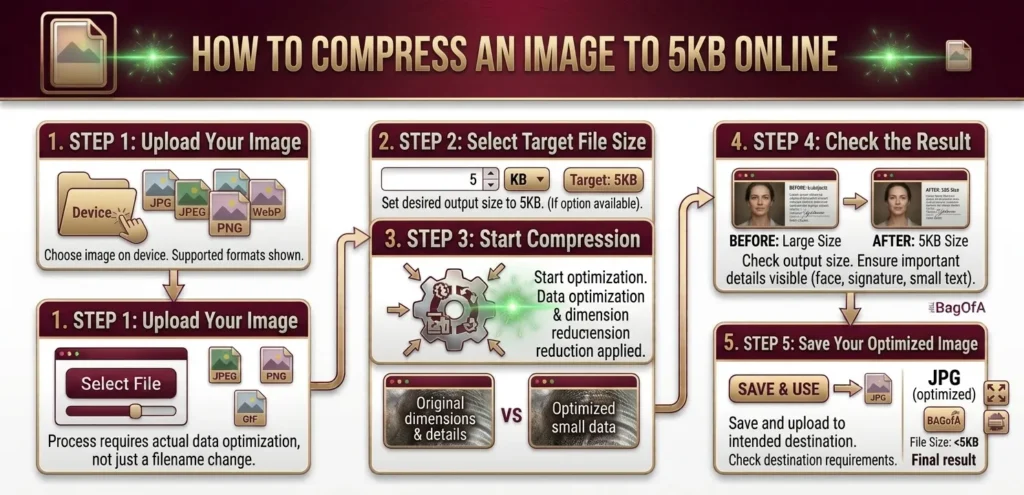
How to Compress an Image to 5KB Online
Reducing an image to 5KB takes more than simply changing its filename. The actual file data needs to be optimized, and you may also need to reduce the image dimensions to reach such a small size.
With Bagofa, the process is straightforward.
Step 1: Upload Your Image
Choose the image you want to compress from your device. Depending on the tool’s supported formats, you may be able to use JPG, JPEG, PNG, WebP, and other image types.
Step 2: Select the Target File Size
Set your desired output size to 5KB if the compressor supports a target-size option. If your image must be smaller than 5KB, check that the final file meets the required limit.
Step 3: Start Compression
Let the tool optimize the image. The amount of compression required depends on the original file size, image dimensions, format, and visual details.
Step 4: Check the Result
After compression, check the output file size and open the image to make sure the important details are still visible. This is especially useful for photographs, signatures, and application images.
Step 5: Save Your Optimized Image
Save the compressed image and upload it to your intended website or application. Always check the destination’s image dimensions and format requirements before submitting it.
What Does a 5KB Image Mean?
A 5KB image is a very small digital file. It may be useful when a website or online application limits the maximum size of an uploaded photograph, signature, or other image.
However, file size and image dimensions are two different things. An image measuring 500 × 500 pixels can have a different file size from another image with the same dimensions because the image content, format, and compression settings affect the amount of data stored.
For example, a simple black-and-white signature may be easier to compress to 5KB than a detailed photograph with many colors and textures.
Also, some platforms interpret KB using different measurement conventions. If the upload instructions specify an exact maximum, check the final file size rather than relying only on the selected target.
Why Would You Need to Compress an Image to 5KB?
There are several situations where reducing an image to a very small file size can be helpful.
Meet Online Form Requirements
Some application portals specify a maximum image size. Compressing an image can help you prepare a file that meets those requirements, provided the format and dimensions are also correct.
Make Image Uploads Easier
Large images can take longer to upload, particularly with a slow internet connection. Smaller files generally require less data to transfer.
Reduce Website Image Size
If you’re preparing images for a website, reducing unnecessary file size can help lower page weight. For general website use, though, 5KB may be unnecessarily small for many photographs, so choose a size that maintains suitable visual quality.
Prepare Small Profile Pictures
Certain platforms have strict limits for profile images, thumbnails, or other small graphics. A compressed image can be useful when those restrictions apply.
Save Storage Space
Smaller image files use less storage space. This can be useful when organizing large numbers of images, although the savings from a single file will be small.
Compress JPG, PNG, and WebP Images to 5KB
The best way to reach 5KB depends partly on your image format.
Compress JPG to 5KB
JPG is commonly used for photographs, portraits, and everyday pictures. Its lossy compression can reduce file size by removing some image information.
To get a JPG close to 5KB, you may need to lower the image quality or reduce its dimensions. Examine the final image carefully if it contains text, identification details, or other important features.
Try the JPG to PNG Converter if you need to change the format instead. Keep in mind that changing to PNG does not automatically make a file smaller.
Compress PNG to 5KB
PNG is useful for logos, graphics, screenshots, and images that need transparency. However, detailed PNG images can be difficult to reduce to only 5KB without changing their dimensions or visual appearance.
If your PNG contains large transparent areas or simple graphics, it may compress more efficiently than a detailed image. The actual result depends on the image.
For an alternative format, explore Bagofa’s PNG to WebP Converter.
Compress WebP to 5KB
WebP supports efficient compression for many types of web images. It can be a good choice when you need small image files for online use.
The final file size still depends on the image content, dimensions, and compression settings. A complex photograph may require more data than a simple icon.
If you need a different format, you can also use the WebP to JPG Converter.
What If Your Image Cannot Reach 5KB?
Not every image can be reduced to 5KB while retaining its original dimensions and appearance. If the compressed result is still too large, try these practical steps.
- Reduce the dimensions: Smaller width and height usually mean fewer pixels to store.
- Choose a suitable format: JPG or WebP may work well for photographs, while PNG may be preferable for graphics requiring transparency.
- Adjust compression settings: If available, try a stronger compression level and inspect the result.
- Remove unnecessary metadata: Camera information and other embedded details can contribute to file size.
- Check the actual requirement: Confirm whether the platform requires exactly 5KB or simply a file smaller than 5KB.
For changing dimensions, try Bagofa’s Image Resizer. If you’re working with many pictures, the Bulk Image Resizer may also help.
Where Can You Use a 5KB Image?
A 5KB image may be useful for certain online services and applications, including:
- Registration and membership forms
- Profile picture uploads
- Educational application portals
- Job application forms
- Government websites with strict image limits
- Small website thumbnails
- Digital signatures and simple graphics
- Online forms that specify a very small maximum file size
Requirements vary by platform. Some forms specify the maximum file size, while others also require particular dimensions, accepted formats, or minimum image quality.
Before uploading, read the instructions provided by the website. Compressing an image to 5KB alone does not guarantee that it will be accepted.
Frequently Asked Questions
1. How can I compress an image to 5KB online?
Open the Bagofa Image Compressor, upload your image, and select a 5KB target if that option is available. Compress the file and check the resulting size before using it.
2. Can I compress a JPG image to 5KB?
Yes, a JPG can sometimes be reduced to 5KB by adjusting its quality and dimensions. The result depends on the original image and how much detail it contains.
3. Can I reduce a PNG image to 5KB?
Yes, some PNG images can reach this size, particularly simple graphics. Detailed images may need smaller dimensions or a different format to reach the target.
4. Is it possible to compress a WebP image to 5KB?
Yes, depending on the image and the available compression settings. Simpler images generally require less data than detailed photographs.
5. Can I make an image exactly 5KB?
A compressor may be able to target a particular size, but the exact result depends on the tool and its settings. Check the output file’s reported size after compression.
6. How do I make a photo less than 5KB?
Use an image compressor, select a target below 5KB if supported, and check the result. If the photo remains too large, reduce its dimensions or adjust the compression settings.
7. Will a 5KB image look blurry?
It might. Strong compression can reduce detail, introduce visible artifacts, or make text harder to read. The effect depends on the original image and the amount of compression applied.
8. Which image format is best for a 5KB file?
JPG and WebP can be useful for photographs, while PNG may suit simple graphics and images that need transparency. The best option depends on your image and the destination platform’s requirements.
9. Why does an online form require a 5KB image?
Some platforms impose very small file-size limits to control uploads or accommodate specific application requirements. Check the instructions to understand the exact limit.
10. Can I compress a large photograph to 5KB?
It may be possible, but a large, detailed photograph could lose substantial quality or need significantly smaller dimensions. Always inspect the final result before submitting it.
11. Does reducing image dimensions help lower file size?
Yes. Reducing the width and height decreases the number of pixels in the image and can substantially reduce its file size.
12. Can I compress an image to 5KB on my phone?
You can use an online image-compression tool through a supported mobile browser. Choose your image, adjust the available settings, and check the output before uploading it elsewhere.
13. Is 5KB smaller than 10KB?
Yes. A 5KB file is approximately half the size of a 10KB file when both are measured using the same convention.
14. Should I convert PNG to JPG to reduce the file size?
It may help for photographs, but JPG does not support transparency and uses lossy compression. If transparency matters, consider retaining PNG or using a suitable alternative that supports it.
15. Can I compress several images at once?
That depends on the tool and its available features. If you need to resize multiple images, try Bagofa’s Bulk Image Resizer.
Related Image Tools
You may need more than compression when preparing images for websites, applications, or digital documents. These Bagofa tools can help with other common image tasks.
Image Compressor
Reduce image file sizes for easier storage, sharing, and online uploads.
Use Image Compressor →Image Resizer
Change image width and height to match the dimensions required by a website or application.
Use Image Resizer →Bulk Image Resizer
Resize multiple images when working with a collection of photographs or graphics.
Use Bulk Image Resizer →JPG to PDF Converter
Combine or convert JPG images into PDF documents for forms, records, and sharing.
Use JPG to PDF Converter →Explore more free online tools on Bagofa.com to prepare your images and documents for everyday digital tasks.
Related Image Conversion Tools
If compression alone does not solve your problem, converting the image to another format may help with compatibility or file optimization.
- JPG to PNG Converter — Convert JPG images to PNG.
- PNG to WebP Converter — Convert PNG graphics to WebP.
- WebP to JPG Converter — Prepare WebP images for platforms that accept JPG.
- WebP to PNG Converter — Convert WebP images to PNG.
- HEIC to JPG Converter — Convert HEIC photos to the widely supported JPG format.
- HEIC to PNG Converter — Convert HEIC images to PNG.
- PDF to JPG Converter — Turn PDF pages into JPG images.
- PNG to PDF Converter — Convert PNG images into PDF documents.
- JPG to GIF Converter — Convert JPG images to GIF format.
- PNG to GIF Converter — Convert PNG graphics to GIF.
- JPG to SVG Converter — Explore JPG-to-SVG conversion for supported graphic workflows.
Make Your Image Ready for Upload
A strict 5KB limit can be frustrating, especially when a website rejects a photo you thought was ready to use. The right combination of compression, dimensions, and image format can make the process easier.
Start with the Bagofa Image Compressor, check the final file size, and make sure the image remains clear enough for its purpose. If you need to adjust the dimensions, use the Image Resizer.
Bagofa brings these everyday image tools together in one place, helping you prepare images for online forms, websites, and other digital tasks with fewer unnecessary steps
Try Bagofa Image Compressor